|
|
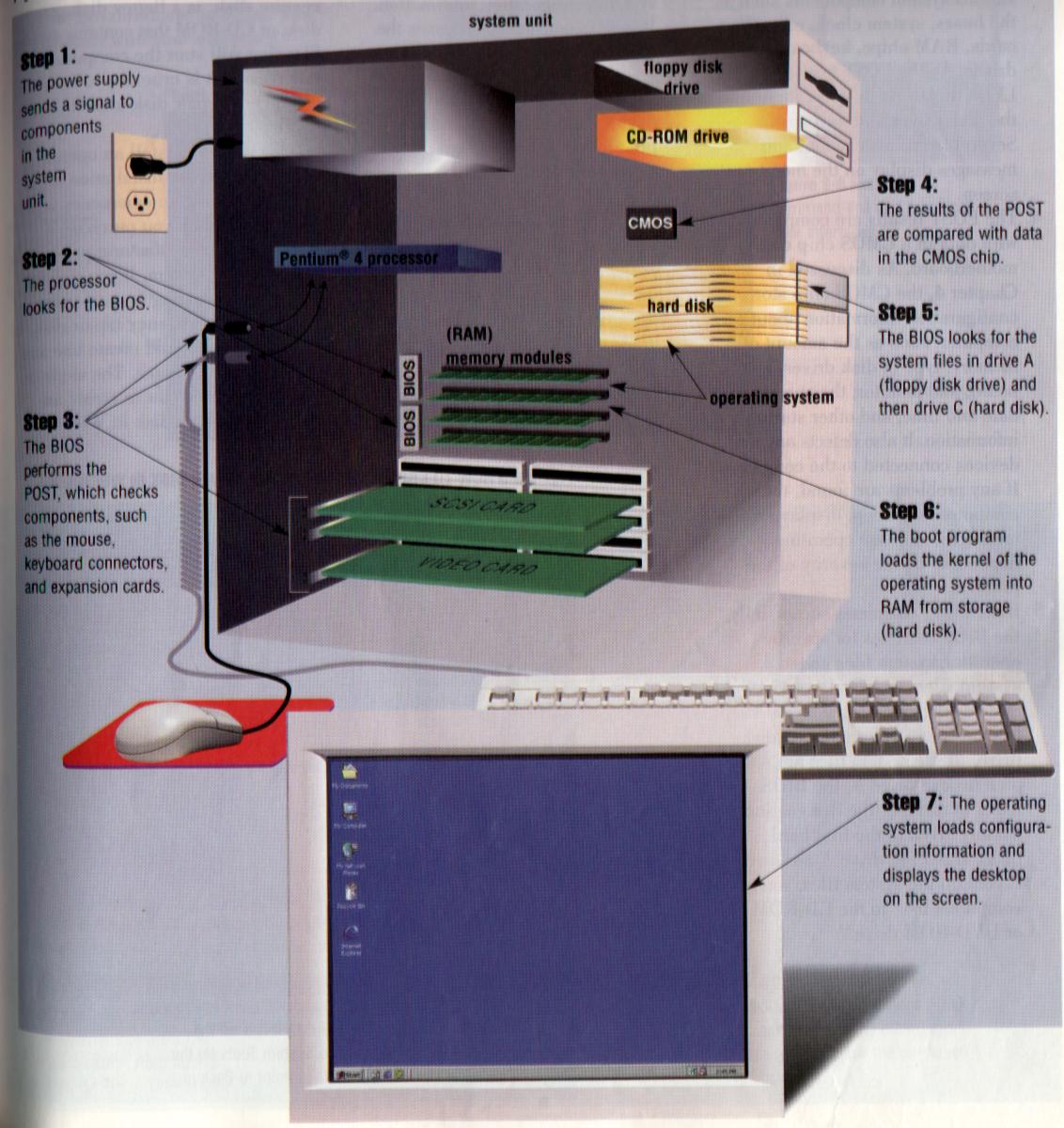
Starting a ComputerBooting is the process of starting or restarting a computer.
When you turn a computer after it has been powered off completely, you are performing a cold boot. A warm boot or warm start is the process of restarting a computer that already is powered on. The kernel is the core of an operating system that manages memory and devices. The kernel is memory resident, which means it remains in memory while the computer is running. Other parts of the operating systems are nonresident. The BIOS (pronounced BYE-ohss), which stands for basic input/output system, is firmware that contains the computer's startup instructions. The BIOS executes a series of tests to make sure the computer hardware is connected properly and operating correctly. The tests, collectively called the power-on-self test (POST), check the various system components such as the buses, system clock, expansion cards, RAM chips, keyboard, and drives. If the POST completes successfully, the BIOS searches for specific operating system files called system files. In Windows, the registry consists of several files that contain the system configuration information. The StartUp folder contains a list of programs that open automatically when you boot the computer. A boot drive is the drive form which your personal computer boots (starts). An emergency repair disk, sometimes called a boot disk or a rescue disk, is a floppy disk, Zip disk, or CD-ROM that contains system files that will start the computer.
|